
Research date: 2026-09-13. This article describes the general plugin capabilities of OpenCode v2, including plugin types, loading, capability registration, execution hooks, permission boundaries, and lifecycle management, as a reference for plugin development and embedded integration.
The code baseline is the
v2branch of the OpenCode repository under study, at commit2308db16387c9b59e88d732a93ec9bac54462b03. Source references use repository-relative paths at that fixed commit. The interfaces and behavior described here apply to that version and do not promise compatibility with other OpenCode versions or the legacy plugin API.This article is a source-code study and capability overview. Code examples illustrate interfaces and calling conventions and have not been independently executed.
Plugin: The Extension Entry Point
What Is a Plugin?
OpenCode extensions connect to existing workflows by registering capabilities and execution hooks. In the current OpenCode v2 implementation, extensions primarily correspond to the Plugin mechanism. Plugins can provide agents, tools, skills, models, and commands, or adjust behavior at specific execution points. The OpenCode core remains responsible for session execution, model requests, tool results, and execution records.
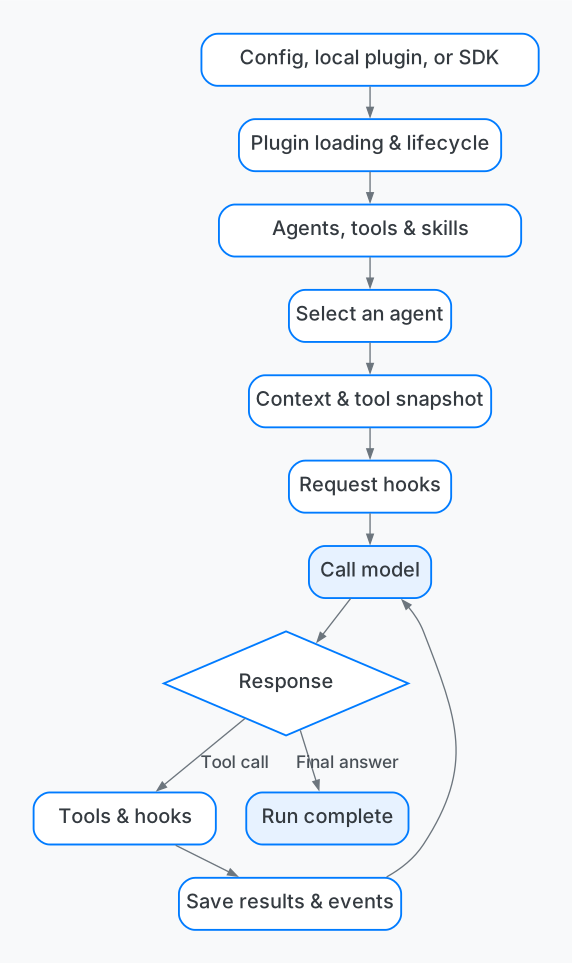
View the Mermaid diagram source
flowchart TD
    A[配置文件、本地插件或 SDK 注册] --> B[插件加载与生命周期管理]
    B --> C[构建助手、工具、技能等能力]
    C --> D[会话选择助手]
    D --> E[准备上下文与工具快照]
    E --> F[请求阶段钩子]
    F --> G[调用模型]
    G --> H{返回内容}
    H -->|工具调用| I[工具执行与钩子]
    I --> J[保存结果与执行事件]
    J --> G
    H -->|最终回答| K[本次执行结束]
Plugin Categories
Internal, external, and SDK plugins differ by their source of integration but ultimately share the same runtime management. All three can register agents, tools, and execution hooks. Their main differences are who supplies the definition, how it enters the host, and whether the host injects additional internal core services. This article covers server-side plugins; TUI plugins for the terminal interface use a separate extension entry point.
| Comparison | Internal plugin | External plugin | SDK plugin |
|---|---|---|---|
| Provider | OpenCode source code and distribution | Project or independent plugin package maintainer | Application host embedding OpenCode |
| Entry point | PluginInternal’s pre / post collection |
Directory discovery, configured files, or packages | Embedded host’s opencode.plugin(definition) |
| Loading form | The core imports definitions directly | The module is resolved and its default export is read | The plugin object is passed directly in memory |
| Available interfaces | Public Context plus host-injected internal services | Public Plugin Context | Public Plugin Context; closures can access dependencies explicitly supplied by the host |
| Primary configuration | Native configuration, internal services, or built-in defaults | plugins[].options → ctx.options |
Host code and closures; the registration interface has no separate options parameter |
| Update source | Follows the OpenCode code version; some plugins watch configuration themselves | Configuration changes, supported local entry changes, or package configuration changes | The host registers the plugin again, incrementing the internal revision |
| Instance scope | Activated independently for each Location | Activated according to each Location’s configuration | Definitions are shared within a host; activation is independent for each Location |
| Use cases | Implementing native agents, tools, providers, and configuration handling | Adding project or business capabilities to an existing OpenCode service | Embedding and managing OpenCode within a JS/TS application |
Effect and Promise are two interfaces for authoring plugins. An Effect plugin object using the public interface can either be default-exported and loaded through configuration or passed directly to the embedded SDK for registration. Its core capabilities can be reused, while loading order and configuration delivery differ.
Internal plugins organize some of OpenCode’s own functionality as plugins. They are not special files installed by users in a directory. The core imports them statically and explicitly includes them in the PluginInternal collection. PluginInternal.list() obtains the services needed by the current Location, injects them into internal plugins through Effect.provide(context), and passes the result to the unified loader.
There are two layers of Context here: effect(ctx) still receives the public Plugin Context. Internal plugins obtain additional services such as Config.Service, Permission.Service, Shell.Service, Location.Service through the Effect environment. Their additional capabilities come from explicit host dependency injection, not from a plugin ID beginning with opencode..
| Internal plugin example | Collection | Actual responsibility |
|---|---|---|
opencode.agent |
pre |
Registering the base definitions of native agents |
opencode.tool.shell |
pre |
Registering the Shell tool with native execution, permission, and runtime-state services |
| Native provider, search, and other tool plugins | pre |
Providing foundational model, search, and tool capabilities |
opencode.config.agent |
post |
Reading agent configuration and related Markdown files and applying the results to the agent catalog |
| Provider, skill, policy, and model-variant configuration plugins | post |
Applying configuration or postprocessing to capabilities contributed earlier |
This also explains the relationship between custom agents and internal plugins: users edit agent configuration, while opencode.config.agent reads, watches, and applies it. Each custom agent is an Agent definition and does not require its own plugin. External or SDK plugins can also register Agents, which configuration plugins may subsequently adjust.
Built-in plugins participate in configuration-based enablement and disablement as well. For example, -opencode.config.agent removes the plugin responsible for applying agent configuration from the active set, affecting that configuration capability. Whether to keep a built-in plugin enabled should be decided according to its actual responsibility.
Adding native functionality that depends on private Core services generally requires changing OpenCode’s source and adding the plugin to the built-in collection. New service dependencies also require corresponding changes to service assembly. These changes are built, released, and upgraded with OpenCode. Internal plugins suit engine functionality; ordinary business tools should prefer public interfaces.
Sources: internal plugin collections and service injection (packages/core/src/plugin/internal.ts), native agent plugin (packages/core/src/plugin/agent.ts), agent configuration plugin (packages/core/src/config/plugin/agent.ts), Shell tool plugin (packages/core/src/tool/plugin/shell.ts).
External plugins add capabilities to an existing OpenCode service through files or packages. “External” means that the code is not in the built-in collection; it still runs inside the OpenCode process. The loader supplies the public Plugin Context without the extra Core service injection provided to internal plugins. It can still access files, networks, and other resources permitted by the runtime. This is neither a separate process nor a security sandbox.
External plugins have two discovery paths:
- Automatic discovery: scans
plugin/andplugins/under native configuration directories. The current implementation directly recognizes.ts,.jsfiles and can also resolve package directories and eligible symbolic links. For a package directory, it first checkspackage.jsonfor a string-valuedexports,module,main, thenindex.ts,index.js. This simple discovery logic should not be treated as support for every complex package-export rule. - Explicit configuration:
pluginsaccepts relative paths, absolute paths, file URLs, and resolvable packages. Relative paths are resolved against the configuration file’s directory. Local paths go through module loading; package targets go through the package resolver, which tries theserversubpath or the package root entry.
Automatic discovery results enter the operation list first, followed by explicit configuration. Configuration can therefore disable automatically discovered plugins. Automatic discovery does not directly enumerate .mjs files. Such entry points must be explicitly configured and loaded by the runtime.
{
  "plugins": [
    {
      "package": "./plugins/example.ts",
      "options": {
        "serviceUrl": "https://api.example.com"
      }
    }
  ]
}
The paths above are configuration-format examples. A plugin uses ctx.options to read serviceUrl and must validate required fields, value ranges, and address restrictions itself. Receiving an object does not mean that its business configuration has been validated.
An external module must default-export a plugin object containing id + effect or id + setup:
| Authoring style | Initialization entry | Integration and cleanup |
|---|---|---|
| Effect | effect(ctx) |
Executed by the host within the plugin Scope; resources use scoped lifecycles or finalizers |
| Promise | setup(ctx) |
The loader uses fromPromise to adapt it to an Effect plugin; initialization may return a cleanup function |
@opencode-ai/plugin/effect provides the Effect API, while the package root @opencode-ai/plugin provides the Promise API for this branch. The legacy plugin API has a separate v1 entry point; sharing the name “OpenCode plugin” does not imply interface compatibility.
The typical loading chain for an external plugin is:
配置目录 / plugins 配置
  → ConfigPluginSource 生成有序操作与本地文件时间戳
  → PluginSupervisor 解析路径或包、导入模块、校验默认导出
  → 适配 Promise 定义,并注入该来源的 options
  → Plugin.Service 创建 Location 内的插件实例
  → 注册助手、工具、钩子及需要清理的资源
File or configuration changes can trigger regeneration of the plugin set. Updates are limited to the supported discovery and watching scope; arbitrary dependency-file changes do not necessarily refresh immediately. In particular, when an explicitly configured entry is a directory, changes inside that directory are not guaranteed to trigger reloading. Package upgrades should also be managed through explicit deployment or configuration changes.
If module import or export-format validation fails, the loader records a warning and skips that source. Initialization failures after activation begins are handled by unified plugin management. When diagnosing availability, verify separately that the file was discovered, the module resolved, the plugin activated, and the capability registered. A configuration entry alone does not prove that a tool is available.
Sources: discovery and local watching (packages/core/src/config/plugin/source.ts), module loading and configuration injection (packages/core/src/plugin/supervisor.ts), public package entry points (packages/plugin/package.json), Promise adapter (packages/plugin/src/promise/adapter.ts).
SDK plugins are registered directly by an embedded host and suit applications that use OpenCode as an internal execution engine. Here, SDK specifically means the @opencode-ai/sdk-next embedded host in the current branch. OpenCode.create() creates a runtime and an in-memory HTTP routing chain within the application process. That internal chain needs no network listener, though tools, models, and business services can still make their own network requests.
The host submits an Effect plugin object directly through opencode.plugin(definition), bypassing external module discovery, package resolution, and default-export validation. This does not upload code to an already running remote OpenCode service. A regular HTTP client or the ctx.plugin.list() in Plugin Context is not this embedded registration entry point.
The following example shows how an embedded host registers and queries plugins. Dependencies must match the research baseline:
import { AbsolutePath, Location, OpenCode } from "@opencode-ai/sdk-next"
import { Effect } from "effect"

const program = Effect.gen(function* () {
  const opencode = yield* OpenCode.create()

  yield* opencode.plugin({
    id: "example.reviewer",
    effect: (ctx) =>
      ctx.agent.transform((draft) => {
        draft.update("reviewer", (agent) => {
          agent.description = "检查代码并给出修改建议"
          agent.system = "分析代码质量,并说明建议的依据。"
          agent.mode = "primary"
        })
      }).pipe(Effect.asVoid),
  })

  const location = Location.Ref.make({
    directory: AbsolutePath.make(process.cwd()),
  })
  return yield* opencode.plugin.list({ location })
})

const result = await Effect.runPromise(program.pipe(Effect.scoped))
console.log(result.data)
The example agent defines only its purpose and prompt; permissions require separate configuration. When the example finishes, the Scope that owns the host closes. A real embedded application should keep that Scope alive throughout the service lifecycle.
The scope and update behavior of SDK plugins have two layers:
| Layer | Managed content | Effective scope |
|---|---|---|
| Host registry | Map<plugin.id, Versioned>, storing definitions and increasing revision numbers |
Shared within one embedded host; each host has its own registry |
| Location activation set | Plugin instances, Transforms, Hooks, and Scopes within that directory context | Activated and cleaned up independently for each Location |
Every registration publishes sdk.plugin.updated. Running Locations regenerate their plugin sets when notified. Locations started later, or restarted after disposal, read the current definitions from the host registry. Registering once at the host level therefore does not mean initialization runs only once. Mutable objects captured in closures may also be shared by multiple Location instances in the same host and must not be assumed to represent a single session’s state.
Registering the same ID again in one SDK registry replaces its definition and creates a new revision. Separate hosts do not overwrite one another. Registration returning means only that the definition was stored and an update published; it does not mean every Location has finished activation. To verify effectiveness, inspect the target Location’s actual plugin and capability lists and wait for activation events when necessary.
The current SDK registry exposes only register and all, with no separate unregister interface. A Location can still disable activation by plugin ID through configuration, but that does not remove the definition from the host registry. Closing the host cleans up runtime resources. A newly created host requires registration again; the in-memory registry is not a persistent installation record.
The SDK registration entry accepts Effect plugins. The external loader’s automatic Promise adaptation does not happen here. To reuse a Promise definition, explicitly use the corresponding fromPromise adapter. The SDK path performs no additional options injection, and the public Context supplies an empty object by default. Hosts typically pass configuration and business clients through factories or closures.
SDK plugins do not automatically receive the Core service environment available to internal plugins. A host may explicitly supply dependencies, but depending directly on private Core services introduces additional version coupling. In the research baseline, sdk-next is still a transitional package marked private: true; this example is not a promise that a stable public npm API is available for installation.
Sources: embedded host entry point (packages/sdk-next/src/opencode.ts), SDK registry (packages/core/src/plugin/sdk.ts), SDK package status (packages/sdk-next/package.json), public plugin host (packages/core/src/plugin/host.ts). Embedded test source (packages/sdk-next/test/embedded.test.ts) covers updates across Locations, reactivation after Location disposal, and isolation between hosts. These cases were reviewed for this article but not independently executed.
The three sources merge into one ordered activation set. Once enabled entries have been determined, the current order is:
内部 pre → SDK 注册插件 → 外部文件 / 包插件 → 内部 post
ConfigPluginSource handles external sources and configuration operations; PluginSupervisor merges them with internal and SDK definitions; Plugin.Service performs the final duplicate-ID checks and manages Scopes, initialization, and replacement. The sources are not three independent execution engines.
This order means that capabilities such as agents contributed by external and SDK plugins can still be adjusted by later configuration plugins. To determine an agent’s final prompt, model, or permissions, inspect the final capability catalog rather than only its initial plugin definition.
Plugin IDs, package names, and entry paths serve different purposes. If configuration loads a file whose exported plugin ID is example.reviewer, disable it with -example.reviewer. Selectors support exact IDs, prefix.*, and *. Configuration operations run in sequence, and later operations may re-enable an existing definition.
Two duplicate-name rules are easy to confuse:
- Registering the same ID again in one SDK registry: updates that definition through a supported registry replacement operation.
- Different active sources contributing the same ID: causes activation to reject that round’s entire set for duplicate IDs; definitions are not silently overridden according to source priority. Do not submit the same plugin definition through both an external file and SDK registration.
Also, the current Plugin.Service skips activation when the IDs and versions of the entire ordered set are unchanged. When the set changes, it iterates over the new set, cleaning up and reinitializing existing plugins. Updating one source can therefore reinitialize other, unchanged plugins. All three plugin types must release resources correctly and must not treat initialization as a business action that runs only once. A failed replacement attempts to restore the plugin’s previous version, but cannot undo external business side effects.
Sources: source merging and enablement order (packages/core/src/plugin/supervisor.ts), unified activation and replacement (packages/core/src/plugin.ts), configuration and loading-order test source (packages/core/test/config/plugin.test.ts).
Core Plugin Mechanism 1: Transform
Transforms declare capabilities; Hooks participate in an individual execution. When choosing an extension point, first determine which domain the requirement belongs to.
| Requirement | Native extension interface |
|---|---|
| Register, modify, or remove agents | ctx.agent.transform |
| Register tools that can actually execute | ctx.tool.transform |
| Provide skill instructions and resource entry points | ctx.skill.transform |
| Add commands | ctx.command.transform |
| Adjust providers, model catalogs, and default selections | ctx.catalog.transform |
| Provide reference-material sources | ctx.reference.transform |
| Configure authentication and connections | ctx.integration.transform |
| Provide a search backend | ctx.websearch.transform |
| Modify the current request’s context and visible tools | ctx.session.hook("context", ...) |
| Inspect tool inputs or organize results | ctx.tool.hook(...) |
| Adjust the model SDK or model instance | ctx.aisdk.hook(...) |
| Adjust model HTTP requests or responses | ctx.session.hook("http.request" / "http.response", ...) |
| Adjust command creation parameters | ctx.shell.hook("create.before", ...) |
| Observe live events | ctx.event.subscribe() |
| Create, submit to, wait for, or interrupt sessions | ctx.session.* |
State domains such as Agent, Catalog, Command, Integration, Reference, and Skill retain active Transforms and rebuild their state from the base state in sequence. Unloading a plugin removes its Transforms and regenerates the result. A Transform should edit only the Draft supplied to the current callback, retain no Draft references, and avoid external business side effects during rebuilding. If external data is needed, load and store it first, then trigger the domain’s reload().
The underlying Tool implementation uses Scope-bound registration and request snapshots. Its lifecycle ownership matches the other domains, but that does not mean all transform methods use identical state containers or return types.
Core Plugin Mechanism 2: Hook
A Hook is an extension point provided by the host within an execution flow. Plugins register callbacks at these points. When OpenCode reaches the corresponding stage, it invokes the callbacks with that stage’s context. Plugins can read data, adjust parameters, or process results according to the interface contract, participating in model requests, tool execution, and related flows.
Using a Hook has two stages: registration and invocation. During initialization, a plugin declares its participation through interfaces such as ctx.session.hook(...), ctx.tool.hook(...). The host invokes the callback only when execution reaches that point. Once registered, the callback may run repeatedly whenever the point is reached. The host waits for it to complete, then continues according to the interface contract. For example, tool.execute.before allows a plugin to return Tool.Error to reject the tool execution.
Transforms build the available capabilities, while Hooks adjust their behavior at specific execution points. For example, register a tool with ctx.tool.transform, inspect the input of an individual tool invocation with ctx.tool.hook("execute.before", ...), and adjust the context about to be sent to a model with ctx.session.hook("context", ...). Hooks participate in the current call chain, while ctx.event.subscribe() subscribes to events to observe execution.
Runtime Hooks execute serially in registration order. Later Hooks see earlier modifications. If several plugins modify the same field, inspect the final loading order. Built-in plugins are divided into leading and trailing collections, so external plugins cannot simply be assumed to override everything last.
| Hook | Content that can be changed or observed | Considerations |
|---|---|---|
session.context |
System prompts, messages, and current-request tool definitions | Agent and model identifiers identify the context; changing messages affects the current request and does not append persistent history |
tool.execute.before |
Tool input | Can return Tool.Error to prevent execution |
tool.execute.after |
Successful result or tool error | Useful for organizing results and adding information |
session.http.request/response |
Model HTTP requests and responses | May expose credentials and complete input; control what is logged |
aisdk.sdk/language |
SDK and actual model instance | Suitable for provider adaptation |
shell.create.before |
Command, directory, timeout, shell, and environment variables | String-based rules alone do not provide operating-system isolation |
Among the current public Hook types, only tool.execute.before declares a recoverable Tool.Error failure channel. Other Hooks should not be treated as general middleware for throwing arbitrary business errors.
Sources: Plugin Context (packages/plugin/src/effect/plugin.ts), state rebuilding (packages/core/src/state.ts), Hook registration and execution (packages/core/src/plugin/hooks.ts), tool registration and snapshots (packages/core/src/tool.ts).
Tool Examples and Lifecycle
Example 1: Define a Tool with a Plugin Transform
A tool contains a model-visible definition and a host-executed function. After the model generates a tool name and input, OpenCode processes the call using the tool capabilities captured for that request. The function receives the host-provided sessionID, agent, messageID and invocation id. Long-running operations can report progress through context.progress().
The following standalone tool example uses the Effect API:
import { Plugin } from "@opencode-ai/plugin/effect"
import { Effect, Schema } from "effect"

export default Plugin.define({
  id: "example.echo",
  effect: Effect.fn(function* (ctx) {
    yield* ctx.tool.transform((tools) => {
      tools.add({
        name: "echo",
        description: "返回收到的文字",
        input: Schema.Struct({ text: Schema.String }),
        output: Schema.Struct({ text: Schema.String }),
        options: { codemode: false },
        execute: ({ text }) =>
          Effect.succeed({
            output: { text },
            content: text,
          }),
      })
    })
  }),
})
Distinguish result fields by their purpose: output is a structured value for programmatic use when an output Schema has been declared; content is supplied to the model and becomes part of session content; metadata carries bounded additional state. Returning output without declaring an output Schema is an error in the current runtime.
The source reveals two validation details that interface names alone do not convey:
tool.execute.beforeruns before Schema decoding inside the tool function. A Hook must therefore treat the input as an unknown structure; decoding happens afterward on the potentially modified input.- Effect Schema and supported Standard Schemas validate inputs at runtime. The plain JSON Schema branch passes input through directly. The plain JSON Schema output branch also checks only that the result is a JSON value, not that it satisfies each declared constraint. Business tools must not equate supplying a JSON Schema to the model with server-side parameter validation.
In the current tool pipeline, failure of the pre-execution Hook immediately aborts subsequent processing. Do not assume that execute.after always runs for such rejections. An audit design must cover rejection paths instead of observing only events after successful execution.
Expected, recoverable tool failures can be mapped to Tool.Error. Cancellation, unexpected programming defects, and successful results must retain distinct meanings; do not swallow them all and return ordinary success text.
Sources: tool types (packages/schema/src/tool.ts), tool execution wrapper (packages/core/src/tool.ts), actual parameter validation (packages/core/src/tool/runtime.ts).
Example 2: Compose Tool Calls with Code Mode
Code Mode determines how some tools are presented and composed. The current branch exposes tools with codemode: false directly to the model. Other tools may enter the Code Mode catalog, where execute runs a small piece of code to combine calls and process results. Actual tool calls made within Code Mode still return to the host’s tool execution path.
This suits sequential queries, filtering, and aggregation. The Code Mode runtime restricts direct file access, imports, and similar operations, but these restrictions do not mean that the entire OpenCode service or external plugins run in an operating-system sandbox. The echo example above sets codemode: false to demonstrate direct exposure of a tool to the model.
A model request captures a snapshot of tool registrations when it is prepared. Hot-updating a plugin does not cause an already prepared request to use a completely new tool catalog; subsequent requests prepare capabilities again. Plugin-contributed execution functions should also avoid depending on unowned background resources that may already have been cleaned up.
Sources: tool classification and snapshots (packages/core/src/tool.ts), Code Mode(packages/core/src/codemode/tool.ts), current-request tool availability checks (packages/core/src/session/model-request.ts).
Plugin Locations
Plugin instances are managed per Location; persistent business state requires separate storage. A Location is an execution context made up of a directory and an optional native Workspace identifier. One OpenCode process can host multiple Locations simultaneously, and the same plugin may activate independently in each.
Each plugin instance owns a Scope containing its Transforms, Hooks, tool registrations, and correctly bound resources. Closing the Scope cleans up those registrations. Plugin-owned timers, network subscriptions, and file watchers also need cleanup bindings. Promise plugins may return a cleanup function from setup, while Effect plugins use the corresponding scoped resources and finalizers.
首次加载 → 创建 Scope → 注册能力与钩子 → 服务会话
文件或配置变化 → 替换插件 → 清理旧 Scope → 激活新版本
新版本激活失败 → 尝试恢复旧版本 → 恢复失败则停用
Local plugin entry files and configuration sources are watched for changes. If an explicitly configured entry is a directory, changes to files inside it do not receive the same automatic hot-update guarantee. Loading, updates, and stopping also depend on actual watcher behavior and runtime state. A claim of hot-update support does not replace verification through the native capability catalog.
Plugin recovery restores code and registrations only; it cannot undo side effects already caused in files, databases, or remote services. Scheduled tasks, approval state, retry counts, and idempotency keys should be maintained in reliable storage. In-memory session state must at least be isolated by sessionID. Module-level global variables may also be shared across plugin instances and require particular care.
Sources: plugin Scopes and recovery (packages/core/src/plugin.ts), plugin file watching (packages/core/src/config/plugin/source.ts).
Plugin Best Practices
Prefer Existing Configuration and Public Interfaces:
- Use Agent configuration when changing only prompts, purpose, or step limits.
- Use a Skill to provide methods and knowledge.
- Register a Tool to add executable operations.
- Use the corresponding Hook to adjust behavior at an execution point.
- When a plugin needs persistent business state or external services, explicitly design storage, authentication, transactions, and idempotency handling. Do not rely on plugin memory to provide these guarantees.
A single-responsibility plugin may consist of one TS extension file. Split capabilities into multiple plugin IDs only when they need independent enablement, versions, or failure policies. Ordinary external plugins should depend on public plugin, client, and schema interfaces and avoid private Core implementations. Distributions should specify compatible host and dependency versions, module entry points, and build methods.
When upgrading a Plugin, check at least the following behaviors instead of merely confirming that its module can be imported:
- Agents, tools, and skills appear in the actual capability catalog, and their contributions disappear after unloading.
- Multiple-plugin ordering, configuration overrides, and final state after failed hot updates behave as expected.
- Tool input, output, cancellation, and execution rejection retain the correct semantics.
- Session model and agent selections actually take effect, and subagents receive the intended permissions and context.
- Custom tools and the services they call correctly check session ownership, business authorization, state transitions, and duplicate requests.
- Persistent state can be restored after a service restart, and missing live events are handled correctly.
- Tool results and events accurately represent progress, completion, failure, and cancellation.
Comments
Join the conversation with your GitHub account. All language editions share this discussion.
View discussion on GitHub